How to Build an AI Agent That Actually Works
Want to learn how to build an AI agent? This practical guide covers everything from defining your goals and preparing data to deployment and testing.

Building an AI agent is a strategic project. The entire process has a few main stages: defining its purpose, getting your data ready, designing its conversations and actions, connecting it with your tools, and then constantly testing and improving it. It all begins with a clear plan, not with code.
Defining Your AI Agent's Purpose and Scope
It’s tempting to jump right into the technology, but that's a classic mistake. An effective agent starts with a simple question: What problem are we trying to solve?
Before you write a single line of code or configure any settings, you need to establish the agent’s core purpose. Will it handle customer support tickets? Qualify new leads from your website? Or maybe automate internal tasks like booking team meetings?
For a wider look at how AI fits into the bigger picture, you might find this guide on how to implement AI in business helpful. This upfront planning makes sure you’re building a solution, not just another piece of software.
Pinpoint the Primary Goal
First, what's the main objective? Are you trying to cut down on the number of repetitive support tickets your team handles every day? Or do you just want to give people instant answers to common questions after hours? Maybe the goal is to capture more qualified leads by engaging visitors the moment they land on your site.
Your agent's purpose needs to be specific and measurable. Instead of a vague goal like "improve customer service," aim for something concrete, like "resolve 30% of common customer queries without human intervention."
This clarity gives you focus and a clear benchmark for success. Without it, you risk building something that’s technically impressive but doesn't move the needle for your business.
A well-defined purpose acts as a roadmap for every following decision in the building process, from data selection to conversational design. It's the difference between an agent that helps and one that just gets in the way.
Identify Users and Their Needs
Next, who is this agent for? Is it for existing customers who need technical help, or is it for prospects who have questions about your products? Each of these groups has different needs and expectations.
Once you know your audience, start mapping out what they’re likely to ask or do.
- For customer support: Users will probably ask about order status, return policies, or basic troubleshooting.
- For sales: They’ll want to know about pricing, specific features, or how to book a demo with a human.
- For internal operations: Employees might need to ask about company policies or how to submit an expense report.
Creating this list of tasks helps you define the scope of the project. It’s better to build an agent that does a few things exceptionally well than one that tries to do everything and ends up being mediocre. You can always add more capabilities later on.
To get started, it's useful to break down the core elements of your agent's design. This table outlines the key components you'll need to think through during the planning phase.
Key Components of an AI Agent
Thinking through each of these components will give you a much clearer picture of what you need to build and how the different pieces will fit together.
Sourcing and Preparing High-Quality Data

Once you’ve decided on your agent’s purpose, the next job is to give it a brain. An AI agent is only as smart as the information it’s trained on, which means the quality of your data is everything. This is where many projects fall flat, leading to agents that spit out vague, incorrect, or completely useless answers.
The goal here is to feed your agent clean, relevant, and well-organized information. This process is a core part of a technique called Retrieval-Augmented Generation (RAG), which lets the agent pull from a trusted knowledge source instead of just making things up. To see how this works behind the scenes, you can look at this deeper explanation of what RAG is in AI.
For now, let’s focus on finding and prepping that core information.
Where to Find Your Data
Good news: your company is already sitting on a goldmine of information. The trick is to pull it from the right places and make sure it’s current. The best data sources are often the ones your team already relies on every day.
Just think about where the answers to common questions already live inside your business. Good starting points usually include:
- Your Company Website: Your public-facing site is an obvious first stop. This includes your FAQ page, product descriptions, help center articles, and blog posts. This content is already structured for an external audience, which is a big head start.
- Internal Documents: Don't forget about your internal knowledge. This could be anything from employee handbooks and policy documents to technical manuals and sales scripts tucked away in a shared drive.
- Existing Knowledge Bases: If you use a tool like Zendesk or Confluence, you have a ready-made library of structured information just waiting to be put to work.
Using a platform like Chatiant makes this initial step much faster. Instead of manually copying and pasting everything, you can often just drop in a URL, and the system will automatically pull in all the content from that page.
Cleaning and Structuring the Information
Simply dumping all your data into the system and hoping for the best won't work. You have to prepare it so the AI can understand the context and details accurately. Think of it like organizing a library. If the books are just piled on the floor, no one can find anything.
This is the data cleaning phase, and it’s a necessary step if you want to build an AI agent that people trust.
Preparing your data is about quality control. Every piece of outdated or poorly formatted information you remove is one less bad answer your agent can give to a user.
To get started, you’ll need to go through your collected information and fix any obvious issues. This comes down to a few practical steps:
- Remove Outdated Content: Get rid of old articles, information on retired products, or policies that are no longer in effect.
- Fix Formatting Issues: Correct typos, broken links, and inconsistent formatting. An AI can get tripped up by messy HTML or strange text layouts.
- Organize Logically: Group related information together. For example, all of your pricing information should be in one place, and all of your support articles should follow a similar structure.
This prep work pays off immediately. A clean, well-structured knowledge base is the foundation for an AI agent that delivers accurate, helpful, and reliable answers from its very first conversation.
Designing Conversations That Actually Do Something
Once you've fed your agent the right data, it's time for the fun part: shaping its personality and teaching it how to perform real-world tasks. This is where you graduate from a simple Q&A bot to an interactive agent that genuinely solves problems. The whole point is to figure out what a user wants and then permit the agent to do something about it.
It all starts with designing intents. An intent is just the goal a user has in mind. Think of it as the "why" behind their message. A user isn't going to type, "I would like to initiate the demo booking process." They're going to say "book a demo," "can I see a demo," or "schedule time." All of those phrases point to the same intent.
From Intent to Action
Identifying these intents is only half the battle. The other half is connecting them to custom actions. An action is what your agent does in response to a user's intent, and it's what makes your agent a problem-solver instead of a simple information kiosk.
Here are a few examples of how this looks in practice:
- Intent: "track my shipment" → Action: Look up the order status in your logistics software.
- Intent: "what's the price" → Action: Pull the latest pricing data from your internal product database.
- Intent: "book a meeting" → Action: Connect to a scheduling API like Calendly to find an open time slot.
Tools like Chatiant offer visual builders that make this process surprisingly straightforward. You can map out these conversational flows without writing a single line of code, designing exactly how the agent should respond based on different user inputs. Getting the conversational flow right is important for a good user experience. For a much deeper look at this, check out our guide on chatbot conversation flow design.
Creating Lookups for Real-Time Data
One of the most powerful actions you can give your agent is a lookup. A lookup is when the agent fetches real-time data from another system to answer a question. Imagine a customer asking, "Is the blue T-shirt in stock in a size large?" A static knowledge base is useless here.
But an agent with a lookup action can ping your inventory management system, grab the current stock level, and come back with an accurate, up-to-the-minute answer. This makes your agent incredibly valuable for any task that relies on live information.
The ability to perform lookups and other custom actions separates a basic chatbot from a true AI agent. It's the difference between reciting a script and actively assisting a user with a specific, personal request.
Experimenting with Prompts and Responses
To get these conversations and actions just right, it helps to play around. Tools like the OpenAI Playground give you a hands-on environment to experiment with different prompts and see how the model behaves. This is a great way to refine how your agent understands and responds to all the different ways a user might phrase a request.
As more companies see the value in these advanced capabilities, they're putting real money behind them. A recent survey of 300 senior executives showed that 88% planned to increase their AI-related budgets in the coming year, with AI agent projects being a top priority. With 79% of these organizations already using AI agents, 66% reported measurable gains in productivity, proving there's a clear business case for building smarter agents. You can look into more of these findings on AI agent adoption from PwC.com. The trend is clear: building an AI agent with robust, helpful actions is no longer a novelty; it's a strategic necessity.
Integrating Your Agent with Business Platforms
An AI agent becomes truly valuable when it shows up where your teams and customers already work. Connecting it to your existing business platforms is how you move from a standalone tool to a fully embedded assistant. This is where your agent starts delivering real, measurable results.
The process is more than just copying a snippet of code. It’s about creating a smooth user experience, whether the agent is helping an employee in Slack or a customer on your website. You need to configure its behavior for each specific platform so it can maintain conversational context and provide consistent help everywhere.
Connecting with Internal Communication Tools
For internal use, integrating your agent with platforms like Slack or Google Chat can automate a ton of routine tasks. Instead of interrupting a coworker, a team member can just ask the agent for information directly within a chat channel.
Think of these common scenarios:
- Sales teams can ask the agent for the latest product specs or pricing information without leaving their chat.
- Operations teams can get updates on a project's status or find company policy documents instantly.
- Customer success teams can use it as a Helpdesk assistant, quickly pulling up customer data or solution articles.
This kind of integration keeps your team focused and productive. It reduces context switching and makes sure everyone has immediate access to the same, accurate information, right where they're already communicating.
Here’s a simple visual of how the agent processes a request, from figuring out what the user wants to actually doing something about it.
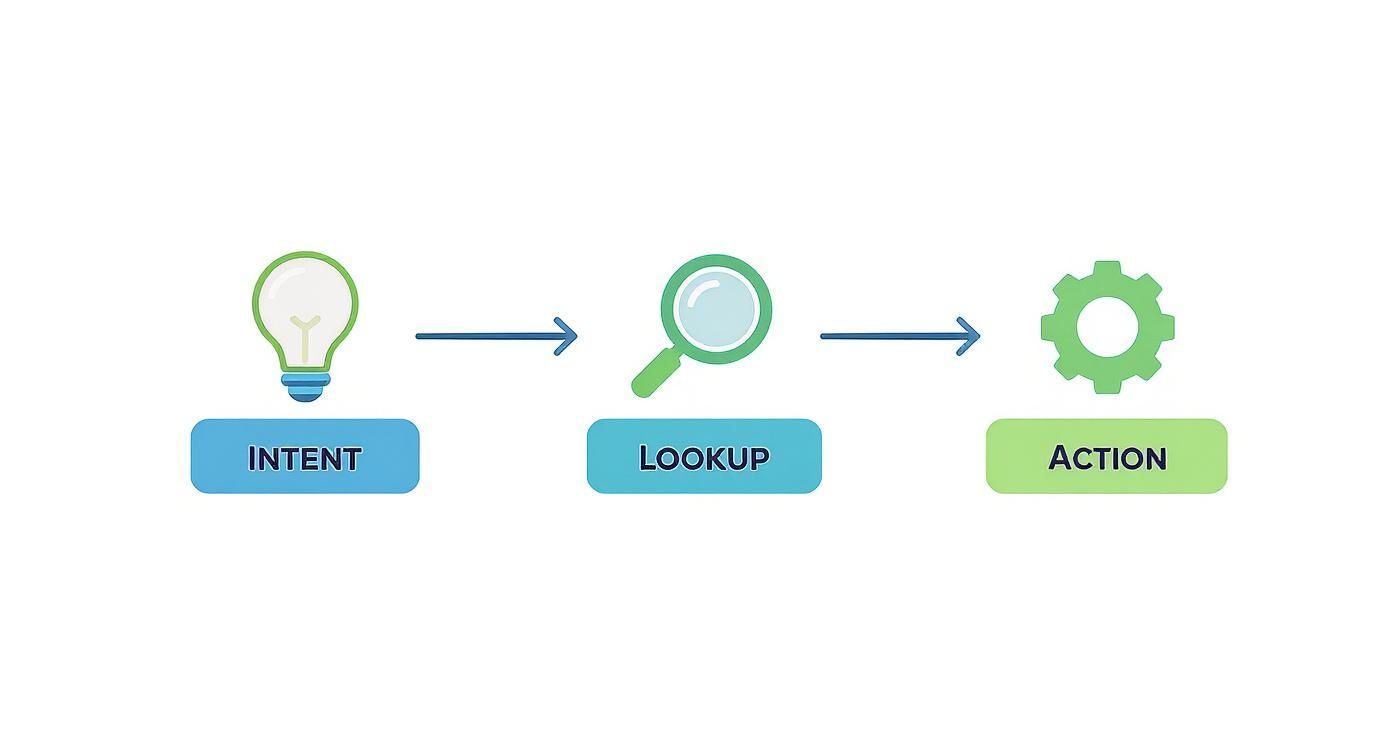
The key insight here is that the agent’s ability to perform an "Action," like a data lookup, is what makes these integrations so powerful and practical.
Embedding on Your Website
For customer-facing agents, embedding them on your website is the most direct way to provide support and capture leads. Platforms like Webflow and WordPress make this pretty simple, often just requiring you to add a small piece of JavaScript to your site’s header.
Once embedded, the agent can engage with visitors 24/7, answering common questions, guiding them to the right resources, or scheduling demos. A well-placed agent on a pricing page, for example, can address specific feature questions and convert hesitant visitors into qualified leads.
Integrating an agent into your website is about creating a proactive, helpful touchpoint that improves the customer journey from the moment they land on your page.
This is where the real power of building an AI agent shines. It becomes a tireless member of your team, working across multiple platforms at once.
To help you decide where to focus your efforts, here's a quick comparison of the most common integration points and their benefits.
Platform Integration Comparison
Each platform offers a different strategic advantage, so think about where your agent can have the biggest impact first.
Technically, these integrations are often handled through APIs, which allow your agent to communicate with other software in a structured way. If you want to get into the nuts and bolts of how this works, you can find a lot more detail in our guide explaining the role of an API for a chatbot. Understanding this connection is a big part of creating custom actions that make your agent genuinely useful.
Testing Your Agent and Making Improvements
Launching your AI agent is just the starting line. A good agent only becomes great through a constant cycle of testing, learning, and refining. This is where you turn that initial build into a long-term asset that gets smarter with every single interaction.
It's not just about squashing bugs; it's about making your agent more valuable over time. This potential for continuous improvement is a huge driver behind the AI market's growth, which was recently valued at around $391 billion and is expected to hit nearly $3.5 trillion by 2033. You can look into more of this data with these AI statistics from Exploding Topics. That massive investment is happening because AI agents are built to learn, not just execute.
Simulate Real User Conversations
Before you let your agent talk to actual users, you need to put it through its paces. The best way to do this is by simulating realistic conversations. Put on your user hat and actively try to break the agent's logic.
- Ask ambiguous questions. See how it copes with requests that could mean two different things. Does it ask for clarification or just guess?
- Go completely off-topic. Try to derail the conversation. A good agent should be able to gently guide the user back to a productive path without sounding robotic.
- Use slang and typos. Real people don't use perfect grammar. Your agent needs to be smart enough to understand them anyway.
This kind of stress testing will quickly expose any knowledge gaps or awkward conversational flows, letting you fix them before anyone else has to deal with them.
The goal of testing is to find all the ways it doesn't work yet. Every failure you find is an opportunity for improvement.
Review Conversation Histories for Clues
Once your agent goes live, its conversation logs are pure gold. Make it a habit to regularly review these histories to see what's happening when users interact with it. This is how you build an agent that adapts to real-world needs, not just your initial assumptions.
Be on the lookout for specific patterns:
- Where are users getting stuck or showing signs of frustration?
- What questions does the agent consistently fail to answer correctly?
- Are there common questions you simply didn't anticipate?
These logs are direct, unfiltered feedback. If ten different people ask a question your agent can’t answer, that's a crystal-clear signal to either update its knowledge base or design a new intent to handle it.
Monitor Key Metrics for Performance
Finally, you need to track a few key metrics to get an objective view of your agent's performance. The numbers tell a story that individual conversations might miss, showing you whether the agent is truly solving problems for your users.
Here are a few metrics worth monitoring:
- Resolution Rate: What percentage of conversations does the agent successfully resolve without needing a human to step in? This is your core efficiency metric.
- User Satisfaction: After a chat, ask for a quick rating. This is the most direct feedback you can get on the user's experience. A simple thumbs-up/thumbs-down can tell you a lot.
- Task Completion Rate: If your agent has a specific job, like booking a demo or updating an order, track how often users actually complete that task.
These metrics give you a clear, data-backed picture of what’s working and what isn’t. By constantly testing, analyzing real conversations, and monitoring performance, you create a powerful feedback loop that makes your agent more valuable over time.
Have Questions? We Have Answers
Building your first AI agent can feel like a big undertaking, but it doesn't have to be. Let's tackle some of the most common questions that pop up.
How Much Technical Skill Do I Actually Need?
Honestly, it depends entirely on the path you choose. If you're using a modern no-code platform like Chatiant, you can build a genuinely powerful AI agent without writing a single line of code. These tools are built around visual, drag-and-drop interfaces that let you design conversations, connect integrations, and set up custom actions.
This approach lets you focus on what really matters—your business goals and what your users need—instead of getting tangled up in programming. On the other hand, if you were aiming for a completely bespoke solution built from the ground up, you'd need deep programming skills, most likely in a language like Python.
What's the Single Most Important Part of Building a Good AI Agent?
This is a big one. While every part of the process counts, the two stages that will make or break your project happen right at the beginning: initial planning and data preparation. Everything else you do rests on this foundation.
Think about it: if you don't have a crystal-clear purpose for your agent, it’s going to feel unfocused and won't solve any real-world problems. In the same way, if you feed it messy, irrelevant, or outdated information, it’s only going to give unhelpful or flat-out wrong answers.
Spending that extra time upfront to define the problem and get your data clean is the best investment you can make. It will save you from a world of headaches later on.
How Can I Make Sure My Agent Handles User Data Securely?
Security can't be an afterthought; it needs to be built in from day one. A great starting point is choosing a platform that's already compliant with major data protection regulations like GDPR.
From there, you need a solid process for handling sensitive user information with care. Anonymizing data wherever possible is always a good practice. Here are a few practical steps to take:
- Always use secure authentication methods, like API keys, when connecting your agent to other systems.
- Regularly audit your agent's permissions. Does it really need access to all that data, or just a small slice of it?
- Be transparent with your users. Tell them what data you're collecting and why. It’s a simple step that goes a long way in building trust.
How Do I Know If My AI Agent Is Actually Working?
You'll want to track a mix of both performance metrics and business outcomes. Looking at the right numbers will tell you if your agent is truly making a difference or just spinning its wheels.
On the performance side, keep an eye on key indicators like the containment rate (how many conversations are fully resolved without needing a human) and user satisfaction scores. You can also measure task completion rates to see if users are successfully achieving their goals, like booking a meeting or finding a specific document.
From a business perspective, you should be able to see a measurable impact. Are you seeing a drop in routine support tickets? Are you getting more qualified leads captured by the agent? That's when you know it's working.
Ready to build an AI agent that delivers real results for your business? With Chatiant, you can create a custom agent trained on your own data in minutes—no coding required. Start your free trial today.

Mike Warren
Porttitor pellentesque eu suspendisse porttitor malesuada odio tempus enim. Vitae nibh ut dui ac morbi lacus. Viverra in urna pretium hendrerit ornare enim mauris vestibulum erat.